HEAT guidance
Choose the guidance that suits your needs: get a quick introduction, explore the methods in detail, check the data needed for your assessment or run many assessments using code through an API feature.
Use the step-by-step guide while completing your assessment.
You can also find answers to common questions in the FAQ and definitions in the Glossary.
Preparing your assessment
Before starting, you will be asked to specify:
- whether you are assessing walking, cycling or both;
- the geographic and time scale;
- whether it is a single- or two-case assessment;
- which health and environmental impacts to include; and
- which user interface you want to use. This determines how many options for adjusting the data are available, but does not change the underlying methodology. See adjusting data inputs.
Some variables can have a strong influence on the results, particularly:
- mortality rates, which may differ substantially between locations; and
- the Value of a Statistical Life (VSL) used to estimate the economic value of preventing premature deaths.
What data do you need?
You will generally need:
- an estimate of the average amount of walking or cycling, based on surveys, counts or assumptions. This can be entered as time, distance, trips, frequency, mode share or, for walking, steps. See active travel data;
- the size of the population covered by the assessment, including the relevant age range; HEAT provides population estimates where possible. See population data.
- for carbon assessments, information on motorized travel may also be useful. HEAT provides default values where data are not available. See carbon assessment.
Typical decision tree for HEAT data inputs
The figure below may be of help in deciding what data to use for a HEAT assessment, illustrating a typical decision tree for HEAT data inputs on (active) mode data for a two-case assessment
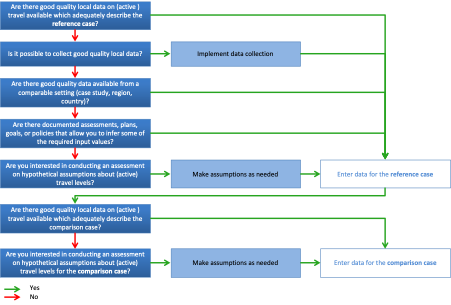
After you enter the basic data, HEAT provides options to refine the assessment. Where local data are unavailable, you can use the default values or make informed assumptions. See adjusting data inputs.
You can also enter the cost of promoting walking or cycling if you want to calculate a benefit–cost ratio.
Default values
Where possible, HEAT provides default values that you can use or replace with your own data. See the complete list of default values.
HEAT Methods and user guide booklet
Read the 2024 booklet for the methodology, evidence and detailed user instructions.
Tutorial video
Watch a short introduction to HEAT and its health and carbon impact assessments.
Step-by-step guide
Keep this guide beside the tool for guidance on inputs, adjustments and results.
Data and assumptions
Explore input requirements, default values, adjustment options and methodological assumptions.
HEAT API
Advanced users can now run multiple HEAT assessments via code, using the API feature.